The job ran twice. Why safe reruns decide if a pipeline is production ready
Idempotency in plain words, and the four write patterns that make a Databricks pipeline safe to run again
The load failed at 2:14 in the morning. Nobody noticed, because nobody is awake at 2:14 in the morning.
At 7:05 an engineer opened the failed run, saw a timeout on the source connection, and did the obvious thing. She clicked run again. It finished in nine minutes. Green tick. She closed the tab and got on with her day.
A week later, finance asked why one region''s revenue was up 38 percent for a single Tuesday.
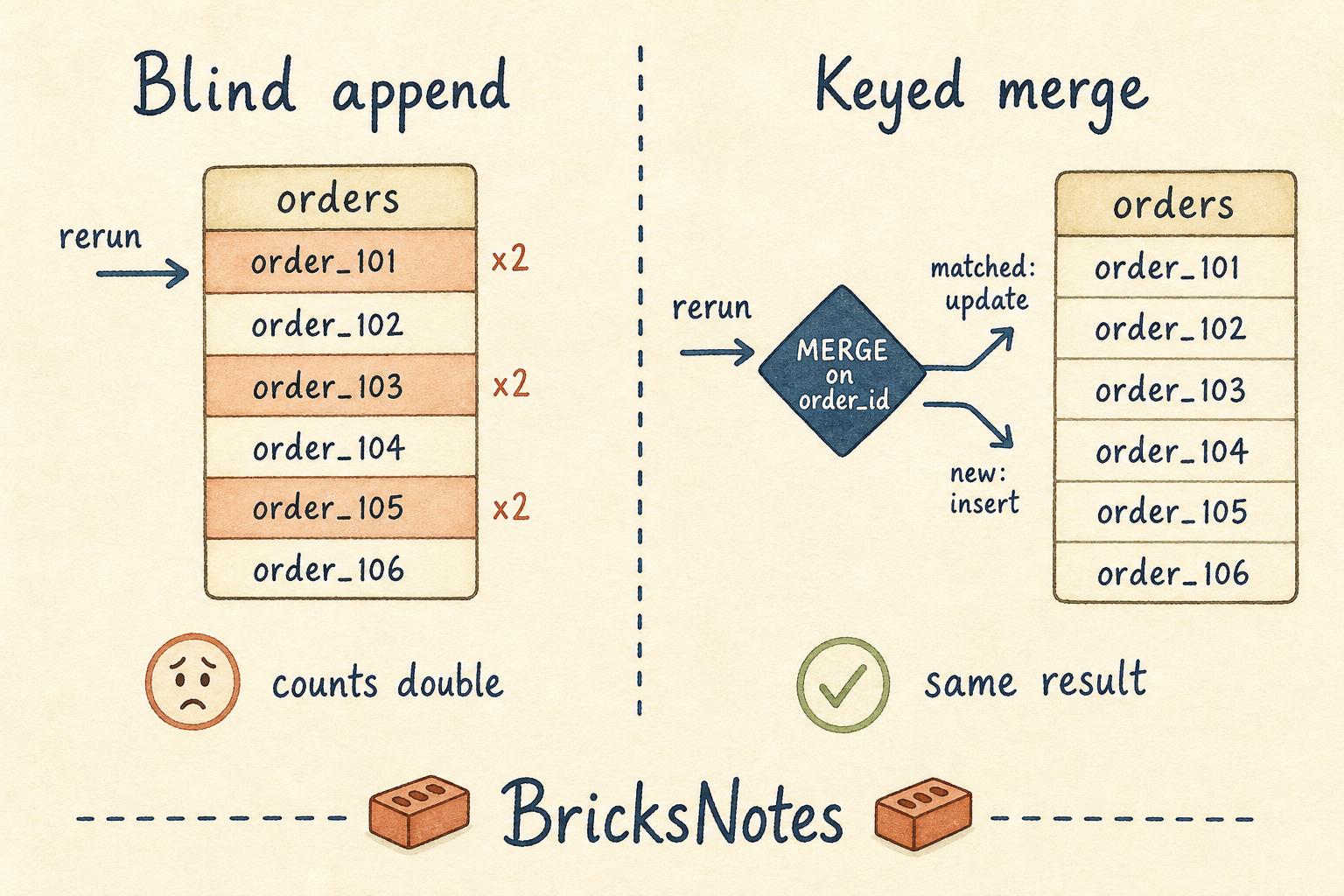
The pipeline had not miscalculated anything. It had simply done its job twice. The first run had already written most of the day''s orders before the source connection dropped. The rerun read the same files and appended them again. Every row was correct. Every row was there twice.
This is the failure that separates a pipeline that works from a pipeline that is production ready. Not the crash. The recovery.
What idempotency actually means
Idempotency sounds like an academic word. It is not. It means one simple thing:
Running the same work again leaves the table in the same state as running it once.
That is the whole idea. If your job runs twice, three times, or ten times on the same input, the table should look identical every time.
Notice what this is not. It is not "the job never fails." Jobs fail. Sources time out, clusters get evicted, upstream teams ship a bad file at midnight. Failure is normal.
The question is what happens next. If a failed run can be safely repeated, a failure is a minor inconvenience. If it cannot, every failure becomes an investigation.
Why appends are the trap
Most people write their first pipeline with an append. It is the natural instinct. New data arrives, so add it to the table.
from pyspark.sql import functions as F

daily_orders_df = spark.read.format("csv") \
    .option("header", "true") \
    .load("/Volumes/workspace/default/book_data/orders/")

daily_orders_df.write.mode("append").saveAsTable("workspace.default.orders")
This code is not wrong. It is just not repeatable.
An append has no memory of what it wrote last time. It cannot, because you never told it how to recognise a row it has already seen. So a second run produces a second copy, and Delta Lake will faithfully store both, because you asked it to.
The reason this bug survives so long in real systems is that it is invisible in the logs. There is no error. The run is green. The damage only shows up downstream, in a number somebody trusts.
Four patterns that make a rerun safe
There is no single fix, because there is no single kind of pipeline. There are four patterns, and picking the right one is mostly a question about your source.
1. Overwrite, when the source is a full snapshot
If the source gives you the complete current picture each time, the simplest safe write is to replace the table.
customers_df = spark.read.format("csv") \
    .option("header", "true") \
    .load("/Volumes/workspace/default/book_data/customers_source.csv")

customers_df.write.mode("overwrite").saveAsTable("workspace.default.customers")
Run this once or five times, the result is the same. That is what makes it safe.
The cost is that you rewrite everything each run. For a dimension table of a few million rows, that is often fine and worth the simplicity. For a fact table with years of history, it is not.
2. replaceWhere, when you own a window of time
Most batch pipelines do not process everything. They process one day, or one hour. In that case you want to replace exactly that slice and leave the rest untouched.
target_day = "2026-08-15"

daily_orders_df = daily_orders_df.filter(F.col("order_date") == target_day)

daily_orders_df.write \
    .mode("overwrite") \
    .option("replaceWhere", f"order_date = ''{target_day}''") \
    .saveAsTable("workspace.default.orders")
This is the pattern I reach for most often. It gives you the repeatability of an overwrite with the cost of an append. Rerun it as many times as you like, and that one day ends up written once.
Two conditions matter. Your filter and your replaceWhere clause must describe the same rows, and every row you write must fall inside the clause. If they drift apart, you will either delete data you meant to keep or leave duplicates behind.
3. MERGE, when rows arrive more than once
Sometimes a row genuinely comes back. A customer updates a phone number, an order changes status, a late event lands two days after the fact. Here you need a business key, and you need to decide what happens when the key already exists.
MERGE INTO workspace.default.orders AS target
USING staged_orders AS source
  ON target.order_id = source.order_id
WHEN MATCHED THEN
  UPDATE SET *
WHEN NOT MATCHED THEN
  INSERT *
A merge is idempotent because the key does the remembering for you. The second run finds the row already there and updates it in place instead of adding a twin.
The word doing all the work in that query is order_id. A merge is only as safe as its key. If the key is not truly unique in the source, a merge will quietly hide a data problem rather than solve it. It is worth counting first.
SELECT
  order_id,
  COUNT(*) AS row_count
FROM staged_orders
GROUP BY order_id
HAVING COUNT(*) > 1
If that returns rows, fix the source or pick a composite key before you merge.
4. Checkpoints, when the stream should remember for you
For incremental file loads, you do not want to track what has been read. You want the engine to do it. That is what a checkpoint is for.
bronze_events_df = spark.readStream \
    .format("cloudFiles") \
    .option("cloudFiles.format", "csv") \
    .option("cloudFiles.schemaLocation", "/Volumes/workspace/default/book_data/_schema/events") \
    .load("/Volumes/workspace/default/book_data/customer_events/")

bronze_events_df.writeStream \
    .option("checkpointLocation", "/Volumes/workspace/default/book_data/_checkpoints/events") \
    .trigger(availableNow=True) \
    .toTable("workspace.default.bronze_events")
The checkpoint stores which files have already been processed. Restart the job after a failure and it picks up from exactly where it stopped. availableNow=True gives you batch scheduling with streaming bookkeeping, which is usually what a nightly job actually wants.
The trap here is a human one. When something looks wrong, deleting the checkpoint feels like a clean reset. It is not. It tells the stream that nothing has ever been processed, and the next run reprocesses the entire source directory into a table that already holds it. If you delete a checkpoint, you must also decide what happens to the target table in the same breath.
[!notice] On Databricks Free Edition all four patterns run as written, using a Unity Catalog Volume for the source files. Volumes give you a managed path under /Volumes/workspace/default/, so nothing here depends on cloud storage credentials.
Backfills are reruns you asked for
Once your writes are repeatable, something else becomes easy. Reprocessing history stops being frightening.
A backfill is just the same job pointed at an older window. If your daily load uses replaceWhere on a date, a backfill is a loop.
from datetime import date, timedelta

start_day = date(2026, 8, 1)
end_day = date(2026, 8, 14)

current_day = start_day
while current_day <= end_day:
    day_string = current_day.isoformat()

    day_df = spark.read.format("csv") \
        .option("header", "true") \
        .load("/Volumes/workspace/default/book_data/orders/") \
        .filter(F.col("order_date") == day_string)

    day_df.write \
        .mode("overwrite") \
        .option("replaceWhere", f"order_date = ''{day_string}''") \
        .saveAsTable("workspace.default.orders")

    current_day = current_day + timedelta(days=1)
Two weeks of history, corrected, with the normal schedule untouched. No manual deletes, no "please do not run the job tonight" message in a channel.
This is the quiet payoff of idempotency. It is not really about surviving failures. It is about being able to change your mind. Fixed a bug in a transformation? Rerun the affected range. Added a column? Rerun the affected range. When reruns are safe, correcting the past becomes routine work rather than an incident.
How to tell if your pipeline is safe
You do not need a framework for this. You need ten minutes and a count.
Pick a pipeline. Run it once on a fixed input and record the row count and a couple of sums.
SELECT
  COUNT(*) AS row_count,
  SUM(order_amount) AS total_amount
FROM workspace.default.orders
WHERE order_date = ''2026-08-15''
Now run the same job again, with the same input, changing nothing. Run the same query.
If the numbers match, your pipeline is repeatable. If they moved, you have found a duplicate risk that is currently one failed night away from reaching a dashboard.
Do this for the pipelines that feed anything a person reads. It is the cheapest reliability test in data engineering, and almost nobody runs it.
The habit worth keeping
Correct code and repeatable code are not the same thing. Code is correct when it produces the right answer once. It is repeatable when it produces the right answer no matter how many times it runs.
Production is not the place where your code is correct. It is the place where your code runs again, at 7am, after something went wrong, while somebody is guessing at what the first run managed to finish.
Write for that morning.
Continue learning
- Delta Lake explains the transaction log that makes overwrite,
replaceWhereandMERGEatomic in the first place. - Incremental processing goes deeper into checkpoints, Auto Loader and reading only what is new.
- ETL pipelines covers the shape of a bronze to silver to gold flow where these patterns live.
- Lakeflow Declarative Pipelines shows how the platform handles some of this bookkeeping for you.
- Streaming table or materialized view is the next decision you will face once reruns are safe.
- Reruns,
MERGEand checkpoint behaviour are heavily tested topics. Try the Data Engineer Associate practice exam and see how they feel in question form.
If you want the full path, from files and formats through to production pipelines, the first three chapters of the book are free to read.