The checkpoint trap is finally fixable: resize stateful Spark streams without starting over
Databricks Runtime 18.0 or later can redistribute a running Structured Streaming query’s saved state across a new partition count while keeping its checkpoint. Here is what changed, why it matters, and how to use it safely.
A stateful streaming job often begins with a reasonable guess.
Four partitions should be enough. Traffic is modest. The state is small. Every micro-batch finishes comfortably before the next one arrives.
Six months later, the same stream is processing ten times as many events. A few customer keys are hot. State has grown. Micro-batches now take longer than their trigger interval, and the input queue keeps growing.
The obvious fix appears to be simple: increase the partition count.
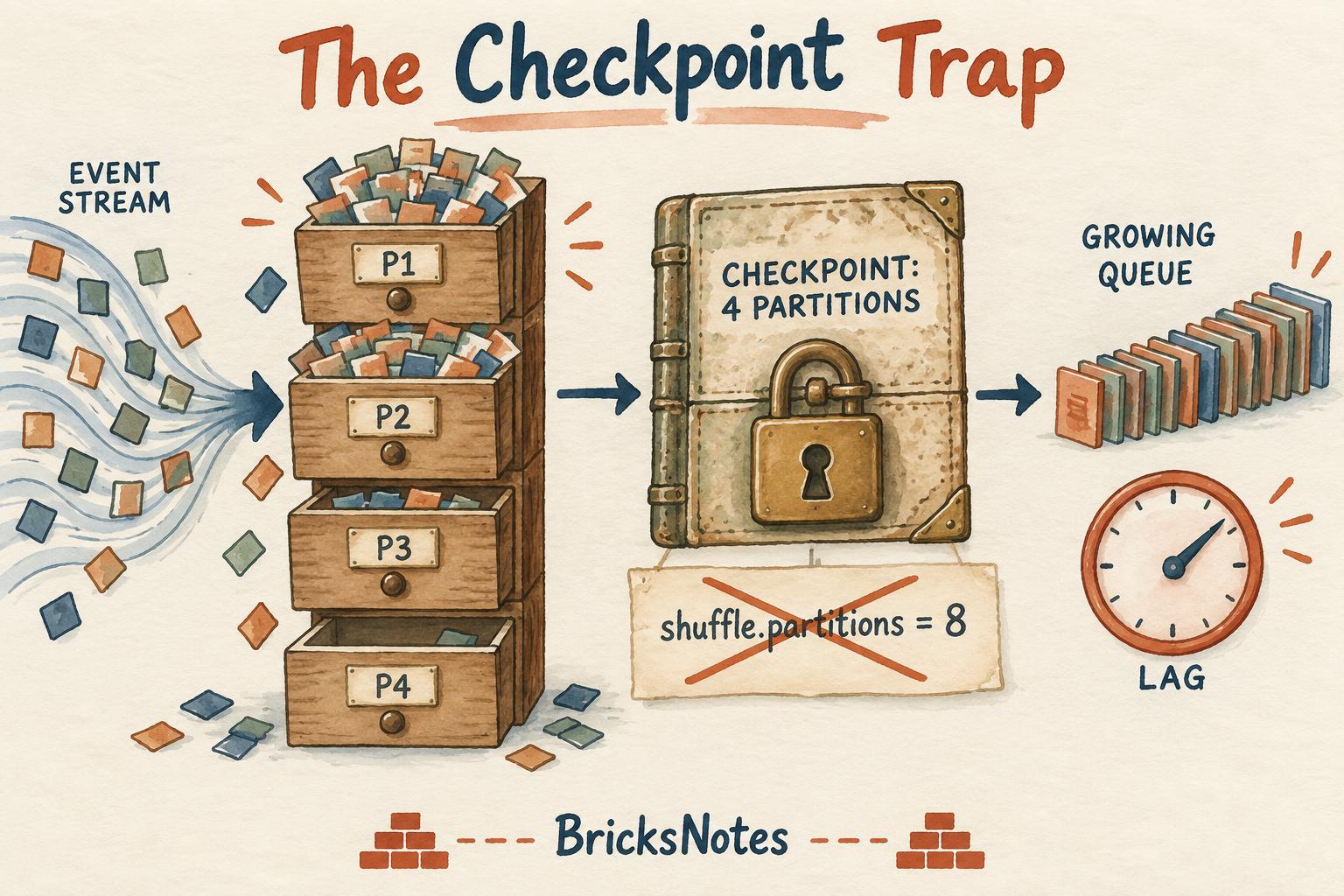
For a stateful Apache Spark Structured Streaming query, it was not simple at all. The partition count was tied to the existing checkpoint. Changing spark.sql.shuffle.partitions and restarting could not safely remap the accumulated state. Teams often had to keep the old shape, create a new checkpoint, or rebuild state from the source.
Databricks has now introduced on-demand state repartitioning. In Databricks Runtime 18.0 or later, a stateful query using the RocksDB state store can restart with a different state-store partition count while preserving its checkpoint and accumulated state.
This is a narrow feature with a large operational consequence. It removes one of the most painful constraints in long-running stateful streams.
The BricksNotes view: state repartitioning does not make streaming self-managing. It gives engineers a controlled way to correct an old capacity decision without throwing away business history.
The production problem behind the feature
Consider a stream that watches online orders for suspicious behavior.
For every customer, it keeps a rolling count and total value of orders seen during the last thirty minutes. That rolling information is state. Spark needs it because the answer for the next event depends on events that arrived earlier.
A simple version might look like this:
from pyspark.sql import functions as F

orders = (
    spark.readStream
         .table("bronze.order_events")
         .withWatermark("event_time", "20 minutes")
)

customer_activity = (
    orders
      .groupBy(
          F.window("event_time", "30 minutes"),
          F.col("customer_id")
      )
      .agg(
          F.count("*").alias("order_count"),
          F.sum("amount").alias("order_value")
      )
)

query = (
    customer_activity.writeStream
      .option("checkpointLocation", "/Volumes/ops/checkpoints/customer_activity")
      .trigger(processingTime="1 minute")
      .toTable("silver.customer_activity_30m")
)
Spark does not recompute every customer's thirty-minute history from zero for every micro-batch. It saves intermediate state in a state store. The checkpoint records the query's progress and the information needed to recover consistently after a restart.
That durability is why checkpointing is so valuable. It is also why changing the physical shape of state has historically been difficult.
Four ideas to understand first
1. A partition is a unit of parallel work
Spark distributes records across partitions. More partitions can create more parallel tasks, if the cluster has enough cores and the data is distributed reasonably.
More is not automatically better. Every partition adds scheduling, files, metadata, and state-store overhead. The goal is not the largest count. It is a count that gives useful parallelism without producing waste.
2. Stateful operations remember earlier events
Aggregations, stream-stream joins, deduplication, session windows, and arbitrary stateful processing may need to retain information across micro-batches.
A stateless transformation can read one event, transform it, and forget it. A stateful operation cannot always do that. It needs yesterday's or one minute ago's information to interpret the next record.
If this distinction is new, start with the BricksNotes lesson on Structured Streaming and the guide to incremental processing.
3. The checkpoint is more than a bookmark
People often describe a checkpoint as the location that tells Spark where to resume. That is true, but incomplete.
For stateful queries, the checkpoint also anchors the query's stateful execution. It protects progress, recovery information, and state-store coordination. Treating it like a disposable cache can cause duplicate output, missing continuity, or an expensive replay.
4. Skew can make an average look healthy
Suppose four partitions process 25 percent of events each. The work may be balanced.
Now suppose one large customer produces 55 percent of all events. One task can become the long pole while the others finish early. Average CPU may look acceptable even while every batch waits for one overloaded partition.
Before adding partitions, confirm whether the problem is overall capacity, skew, state growth, a slow sink, or an upstream surge. Our data skew guide explains why one slow task can control the whole stage.
Why changing shuffle partitions was not enough
A common first attempt is this:
spark.conf.set("spark.sql.shuffle.partitions", "8")For a new query, that setting can influence shuffle partitioning. For an existing stateful query, blindly changing it does not safely rewrite the old checkpointed state into a new layout.
The saved state was created under the original partition assignment. Spark needs a coordinated transition so every state key moves to the correct new partition, progress remains consistent, and the query can recover if something fails during the change.
This is the checkpoint trap: the very mechanism that protects a production stream can preserve an old sizing decision long after traffic changes.
Before the new capability, the escape routes carried trade-offs:
- keep the original partition count and add compute, even if parallelism remained constrained;
- start with a new checkpoint and replay enough source history to reconstruct state;
- run an old and new query in parallel and reconcile their outputs;
- redesign the query to reduce or externalize state;
- accept downtime or a gap while rebuilding.
For a large state store or a source with limited retention, rebuilding may be slow, expensive, or impossible.
What on-demand state repartitioning changes
Databricks now provides a state-specific configuration:
spark.conf.set("spark.sql.streaming.stateStore.partitions", "8")For eligible stateful queries, this setting takes precedence over spark.sql.shuffle.partitions for the state-store partition count.
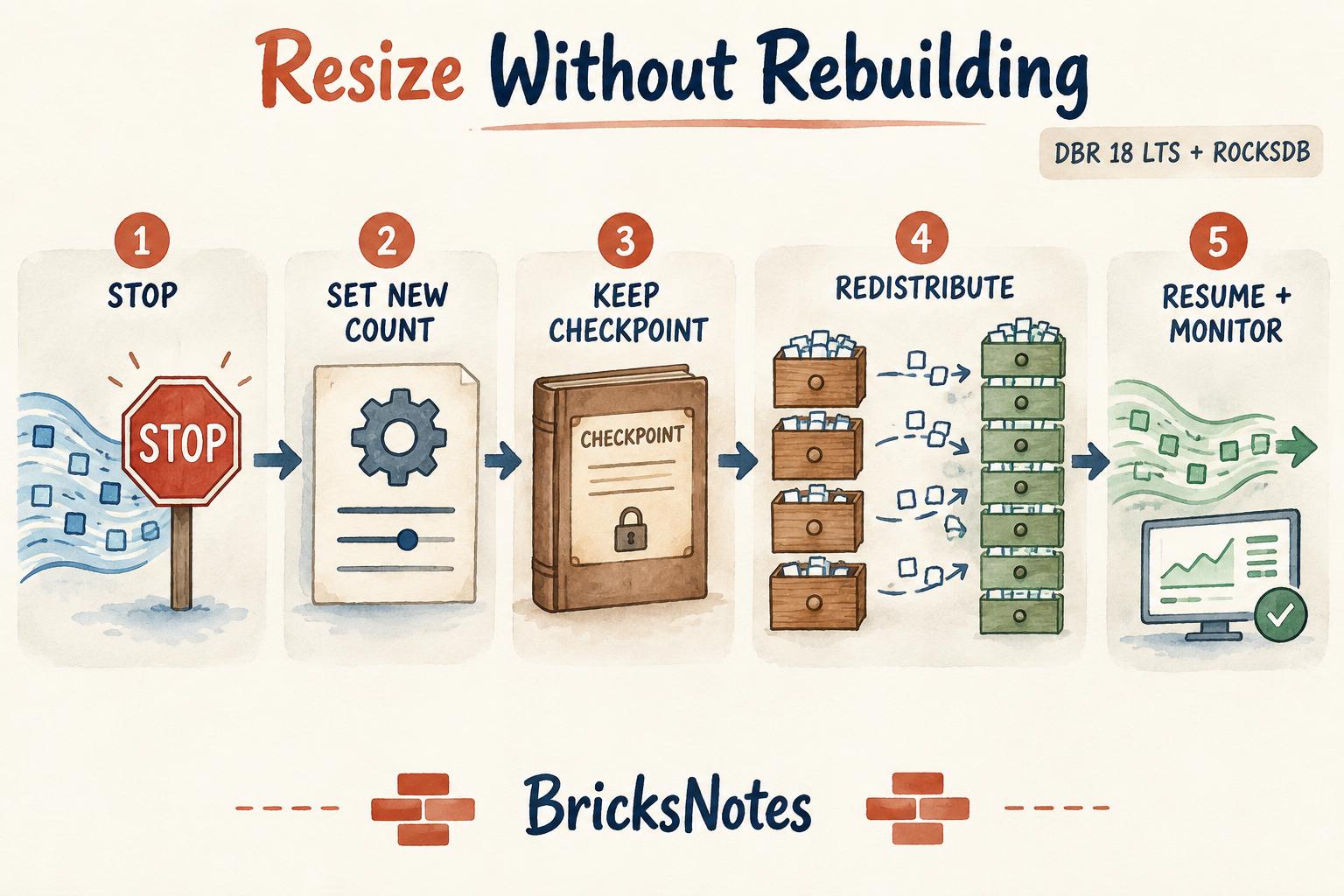
The operational sequence is deliberately controlled:
- Stop the query cleanly.
- Set the new state-store partition count.
- Restart from the same checkpoint.
- Spark completes the last planned micro-batch.
- Spark runs a repartition operation that redistributes existing state.
- Normal micro-batch processing resumes with the new count.
- Monitor the transition and the batches that follow.
The checkpoint remains the continuity line. The state is moved, not forgotten.
The requirements matter
As announced by Databricks, on-demand state repartitioning is in Public Preview.
The documented requirements are:
- Databricks Runtime 18.0 or later or later
- the RocksDB state store provider
- an existing checkpoint that the restarted query can access
- a controlled stop and restart of the query
RocksDB is the default state store provider on Databricks Runtime 17.3 LTS and later. Older queries may have been created with another provider or older settings, so verify the actual query before planning a change.
This is a Databricks workspace capability, not a Databricks Free Edition lab. Free Edition remains useful for learning Structured Streaming concepts, watermarks, windows, partitioning, and checkpoint locations. Testing this specific preview and a production-sized state migration requires an eligible paid workspace and runtime.
Public Preview also means you should confirm the current documentation, regional availability, and support expectations before using it for a critical workload.
A practical resize example
Assume the order-monitoring query currently has four state partitions. Monitoring shows:
- batch duration regularly exceeds the one-minute trigger;
- input rows per second are higher than processed rows per second;
- backlog grows during peak hours;
- all four state tasks are busy, rather than one key causing extreme skew;
- the cluster has enough cores to run more state tasks concurrently.
Eight partitions is a reasonable test, not a magic answer.
Stop the stream using your normal operational process. Keep its checkpoint path unchanged. Then configure the new count before starting the same query definition:
# DBR 18.0 or later, with the RocksDB state store
spark.conf.set("spark.sql.streaming.stateStore.partitions", "8")

query = (
    customer_activity.writeStream
      .option(
          "checkpointLocation",
          "/Volumes/ops/checkpoints/customer_activity"
      )
      .trigger(processingTime="1 minute")
      .toTable("silver.customer_activity_30m")
)
Do not copy this into production as an isolated fix. The code is the easy part. The important work is validating the query, checkpoint, state-store provider, capacity, output guarantees, and rollback plan.
Also remember that a repartition operation itself consumes time and resources. A very large state store will not teleport into a new shape. Plan for the transition period.
The safe rollout checklist
Before the restart
- Record the current runtime, state-store provider, checkpoint path, query ID, partition count, trigger, and cluster shape.
- Confirm that the source can tolerate the planned pause and retain data long enough.
- Measure normal and peak batch duration, input rate, processing rate, state rows, state-store memory or disk use, and backlog.
- Check for skew. More partitions do not fix a single pathological key by themselves.
- Confirm the new count is supported by available cores. Eight partitions on two active cores may only create more waves of tasks.
- Test the same transition with representative data in a non-production environment.
- Define success and rollback thresholds before starting.
- Protect the checkpoint. Do not rename, clean, or partially copy it during the operation.
During repartitioning
- Watch query progress instead of relying only on cluster CPU.
- Confirm that the planned repartition phase begins and completes.
- Watch driver and executor logs for state-store, checkpoint, disk, and memory errors.
- Keep downstream owners informed because no normal output may arrive during the transition.
- Avoid unrelated deployment changes. Change one operational variable at a time.
After processing resumes
- Verify that output continues from the expected point.
- Compare processed input, output counts, and business aggregates around the restart boundary.
- Check whether batch duration and backlog recovery actually improve.
- Watch several watermark windows, not only the first successful batch.
- Confirm late data, deduplication, joins, and timeout behavior remain correct.
- Update the runbook with the new count and the evidence behind it.
The BricksNotes lesson on debugging and monitoring provides the broader habit: start from evidence, isolate the bottleneck, and validate the result.
What should you monitor?
A successful restart is not the same as a successful resize.
Look at four groups of signals.
Throughput and delay
Compare inputRowsPerSecond, processedRowsPerSecond, batch duration, trigger interval, and backlog before and after the change.
If processing remains slower than arrival, the stream is still falling behind.
State size and behavior
Track total state rows, updated rows, removed rows, state-store size, and commit behavior. Sudden unexpected changes may point to a semantic issue, not a performance improvement.
Task distribution
Inspect task duration, input, spill, and state-store metrics across partitions. If one partition still dominates, the problem may be key skew rather than insufficient partition count.
Business correctness
Technical metrics cannot tell you whether one order was counted twice or a late event disappeared. Validate business totals, unique keys, window outputs, and downstream expectations around the restart boundary.
That final layer connects directly to the BricksNotes lesson on data quality. A faster incorrect stream is still incorrect.
When adding partitions will not help
State repartitioning is powerful because it solves a specific problem. It is not a general streaming repair button.
Do not expect it to solve:
- A hot key. One customer, device, or account may still send most records to one partition.
- A slow sink. If the target table or external system limits writes, upstream parallelism may add pressure without increasing completion speed.
- Unbounded state. Missing watermarks, weak timeout logic, or a join that retains too much history needs a semantic fix.
- Too little compute. More partitions need cores and storage bandwidth to run effectively.
- Expensive user code. Slow Python functions, network calls, or serialization can remain the bottleneck.
- A poor trigger choice. Very small triggers may create overhead that dominates useful work.
- Bad input files. A large small-files problem or inefficient source scan may occur before state processing begins.
This is why performance work should begin with the execution evidence, not a favourite configuration. The partitioning and performance lesson is a useful companion.
Can you reduce the partition count too?
Yes, the capability is about resizing, not only scaling out.
A stream may have been over-provisioned for a seasonal peak. Too many tiny state partitions can waste resources through task scheduling, state-store instances, checkpoint activity, and small units of work.
Scaling in can reduce overhead, but use the same discipline. Confirm that the smaller count still handles peak load and does not concentrate large state stores into partitions that are difficult to recover or maintain.
The right count is a capacity decision based on traffic, state shape, skew, cluster resources, and service objectives.
The deeper lesson: operational choices become architecture
The original partition count may have looked like a tuning parameter. Once the query accumulated months of state, it became part of the stream's operational architecture.
This happens often in data systems. A checkpoint path, key choice, watermark, partition count, or schema decision begins as one line of code. Time and business history turn it into a contract.
On-demand state repartitioning makes one contract more adaptable. It does not remove the need to understand that contract.
That is also why the BricksNotes book emphasizes foundations before features. If you understand partitions, state, checkpoints, watermarks, skew, and recovery, a new configuration has a clear place in your mental model. Without those foundations, it is just another switch that may appear to work.
Read the complete learning path in the BricksNotes book, then use the Structured Streaming lesson and incremental processing lesson to connect this release to the core ideas.
A simple decision guide
Consider state repartitioning when all of these are true:
- the query is stateful;
- its existing partition count no longer matches the workload;
- evidence shows that a different count can improve useful parallelism or reduce overhead;
- rebuilding from a fresh checkpoint is expensive or risky;
- the query meets the runtime and RocksDB requirements;
- you can perform and observe a controlled restart.
Look elsewhere first when the real problem is a hot key, slow sink, unbounded state, insufficient compute, or incorrect query design.
What changed, in one sentence
Databricks Runtime 18.0 or later can now take state saved under one partition count, redistribute it to a new count during a controlled restart, and continue from the same checkpoint.
The code change is small. The production value is not.
For teams running long-lived fraud detection, sessionization, monitoring, deduplication, or streaming aggregations, this means yesterday's sizing decision no longer has to force tomorrow's rebuild.
Official sources
- Databricks announcement: On-Demand State Repartitioning for Apache Spark Structured Streaming
- Databricks documentation: Configure state repartitioning
- Databricks documentation: RocksDB state store
Feature status and runtime requirements were checked against the official Databricks sources on September 17, 2026. Preview capabilities can change, so check the current documentation before production use.