Databricks Lakemeter: putting a number on a pipeline before you build it
Someone asks what your pipeline will cost. Lakemeter, the open source tool from Databricks Labs, turns that shrug into an estimate you can defend.
On a Tuesday afternoon, a data engineer named Priya was three weeks into her first pipeline at a new company. The design was clean. Raw events landed in a bronze table, got cleaned into silver, and rolled up into a few gold tables the analysts liked. She was proud of it.
Then her manager stopped by her desk with one sentence.
"Finance wants to know what this will cost per month before we turn it on."
Priya opened a pricing page. She found a DBU rate. She multiplied it by a cluster size she had picked mostly out of habit. She got a number that felt too small, changed one guess, and got a number that felt too big. She sent the bigger one, quietly hoping nobody would ask how she got there.
Nobody did. That was the worst part.
Six weeks later the bill arrived, and it did not match anything in her spreadsheet. Not because Databricks was expensive, but because she had never actually written down what she was assuming. How many events arrived per day. How long they were kept. How often the job ran. Whether the cluster sat idle between runs.
The cost was never the mystery. The assumptions were.
That gap is exactly what Lakemeter tries to close.
What Lakemeter is
Lakemeter is an open source cost estimation tool from Databricks Labs. You install it into your own workspace, where it runs as a Databricks App with single sign-on already wired in.
Inside, you create sizing estimates. You describe a workload, fill in your usage assumptions, and get a cost breakdown you can share with a lead, a finance partner, or a customer.
The code lives at databrickslabs/lakemeter-oss. It is a Labs project, which means it is community supported rather than an official Databricks product. Treat it as a very good tool, not as a contract.
This one needs a paid Databricks workspace, because Databricks Apps are not part of Free Edition. The thinking below is what matters, and you can practice all of it in Free Edition without installing anything.
Watch it first
The walkthrough is the fastest way to see how the flow feels.
https://youtu.be/Ekw5y7aqHbw
Watch what happens after the estimate is created. The interesting part is not the number. It is that the assumptions behind the number stay visible.
How it thinks about cost
Most cost conversations start in the wrong place, the same place Priya started. Someone opens a pricing page, finds a rate, and multiplies.
Lakemeter starts from the workload instead. Each supported workload has its own form, with the assumptions that actually move the bill for that kind of work. You fill in what you know, and the tool maps that to SKUs, compute choices, and regional pricing.
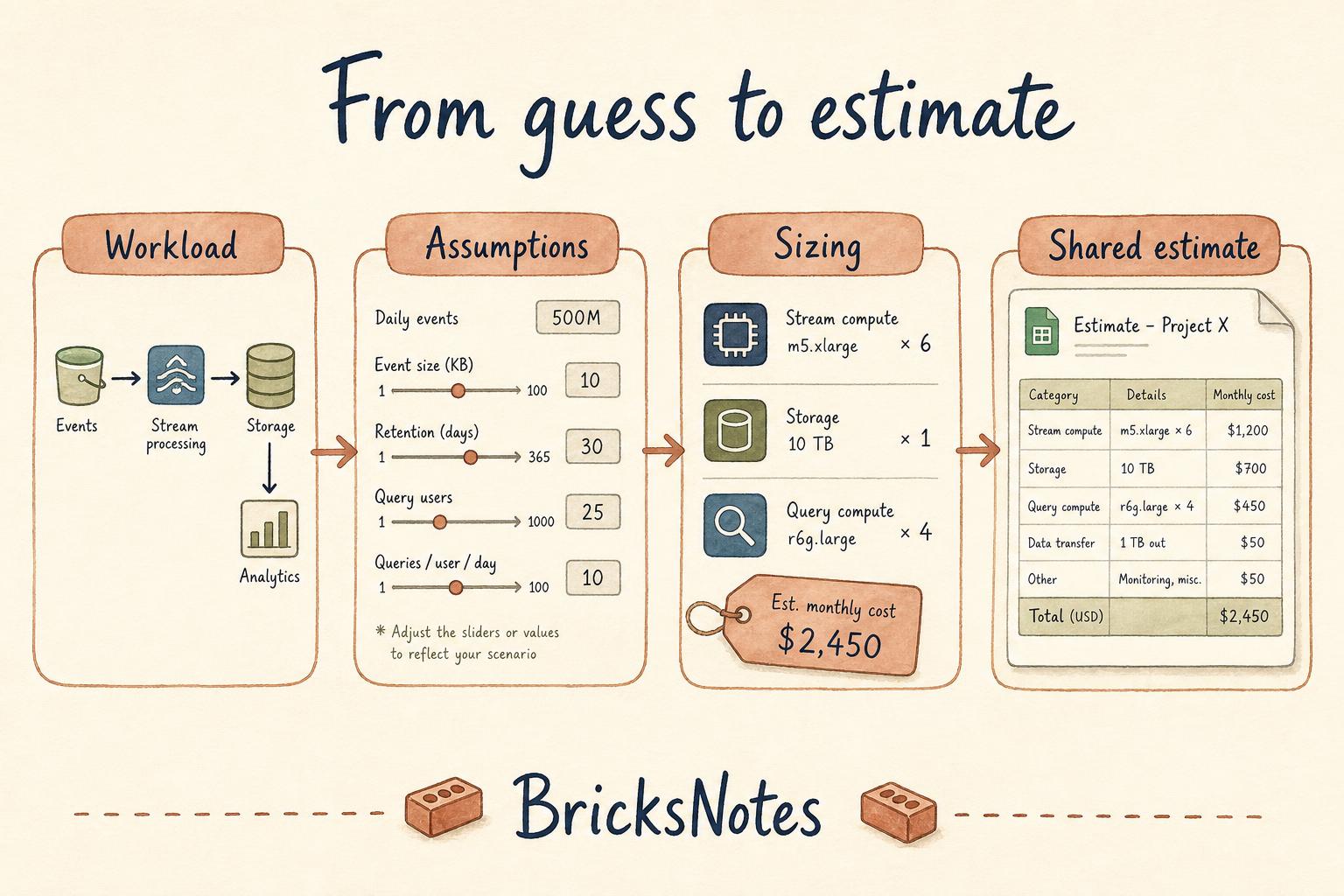
This ordering matters if you are still learning. A rate teaches you nothing. A form that asks how many events arrive per day, how long you keep them, and how often the job runs teaches you exactly which decisions cost money.
You can also inspect the pricing layer directly. There is a SKU Explorer for browsing pricing items and a view for foundation model API token pricing, so the numbers are not hidden behind the estimate.
When the estimate is ready, you export it to Excel with the full breakdown, including SKU details, discounts, and VM pricing.
The four numbers that decide almost everything
If you strip away every pricing detail, most pipeline cost comes down to four questions. Lakemeter asks them in a structured way. You can ask them yourself today, on paper.
How much data arrives, and how often? A job that runs every five minutes on tiny files behaves very differently from a job that runs once an hour on larger ones. Frequency multiplies fixed startup cost. Volume multiplies processing cost.
How much of that data do you re-read? This is the quiet one. A pipeline that reprocesses the whole table each run does not cost a little more than an incremental one. It costs more every single day, forever, and the gap grows with your history.
How long does compute stay awake? Idle clusters are the most common surprise on a first bill. A ten minute job on a cluster that stays up for an hour is a ten minute job you paid an hour for.
How wide is the read? Whether a query scans one day or two years is usually decided by your file layout, not your SQL. Layout is a cost decision wearing a performance costume.
Notice that none of those four are pricing questions. They are design questions. That is why estimating cost early makes you a better engineer even when nobody from finance is in the room.
The AI assistant, used carefully
Lakemeter includes an AI assistant. You describe the workload in plain language, it suggests an estimate, and you accept it with one click if it looks right.
This is genuinely useful for a first pass. It is also the part where a beginner can get lulled.
Read the suggestion as a draft. Ask yourself whether the daily volume it assumed matches reality, whether the retention window is what your business actually needs, and whether the job frequency reflects how the data really arrives. The assistant is good at structure. You are the one who knows the truth about your data.
An estimate you cannot explain is not an estimate. It is a guess with better formatting.
What is under the hood
The stack is worth a look, because it is a fair example of what a modern internal Databricks tool looks like now.
A React front end and a FastAPI back end. Lakebase, which is managed Postgres on Databricks, for storing estimates. Claude through the Foundation Model APIs for the assistant. All of it packaged as a Databricks App, so authentication and hosting come from the workspace rather than from a separate deployment you have to babysit.
A few years ago, an internal tool like this meant a server somewhere, a login system, and a person who remembered how it was deployed. Now it lives beside the data it reasons about.
How to practice this without a paid workspace
You do not need Lakemeter installed to build the instinct it teaches. In Free Edition, take any pipeline you have already written and answer these on one page.
Write down the daily row count and the average file size you expect. Then check what you actually get after a run.
Write down whether your job reads everything or only new data. If it reads everything, write down what it would take to change that.
Write down how long your job runs and how long your compute is awake. The difference between those two numbers is money.
Write down what a typical analyst query filters on, then look at whether your table layout supports that filter.
Do this four times, on four different pipelines, and you will start estimating cost in your head before you write code. That is the actual skill. Lakemeter is a very good way to write it down and share it.
Where to go next in BricksNotes
Every one of the four numbers above maps to a lesson in the book, so you can go and practice the decision rather than just read about it.
Start with Delta Lake to understand what a table really is underneath, because every cost question eventually lands on file layout and history.
Then read Partitioning and Performance for the layout decisions that quietly decide how much data a query has to touch.
Move to Incremental Processing for the single biggest cost lever most beginners miss, which is not reprocessing what you have already processed.
Follow it with Streaming if your data arrives continuously, so you can see how run frequency and idle compute trade off against freshness.
Then Jobs and Pipelines for how scheduling and cluster reuse change your bill without changing a line of transformation code.
Finish with Medallion Architecture to see how bronze, silver, and gold each carry a different cost profile, and why the shape of your layers is a budget decision.
If you are just getting started, Start Here walks you into Databricks Free Edition from zero, and the first lessons are free.
Priya's problem was never the pricing page. It was that nobody had ever taught her which four numbers to write down. Once you know them, a cost estimate stops being a defensive spreadsheet and becomes a design review you happen to be able to share with finance.